
Hunting Down PC Gaming Stutters & Lag with AppControl

Nothing ruins your PC gaming experience faster than a sudden stutter or lag. Most people will Alt+Tab to Windows Task Manager to see what just spiked their system, but a lot of the time everything looks completely idle. That’s because sneaky background tasks including game launcher updaters, cloud sync processes, or privacy-stealing telemetry services will start up for just a split second and then vanish before you can catch them. But fortunately with AppControl there is a solution to this problem.
AppControl is a powered up Task Manager for Windows that logs historical PC resource usage in the background so you can easily review what happened during your gaming session after you finish playing, and take action or "control" to solve the problem.
How to Catch and Fix PC Stutter-Causing Background Tasks
Pinpoint the Lag Spike Timestamp: As soon as you experience a micro-stutter mid-game, note the approximate time.
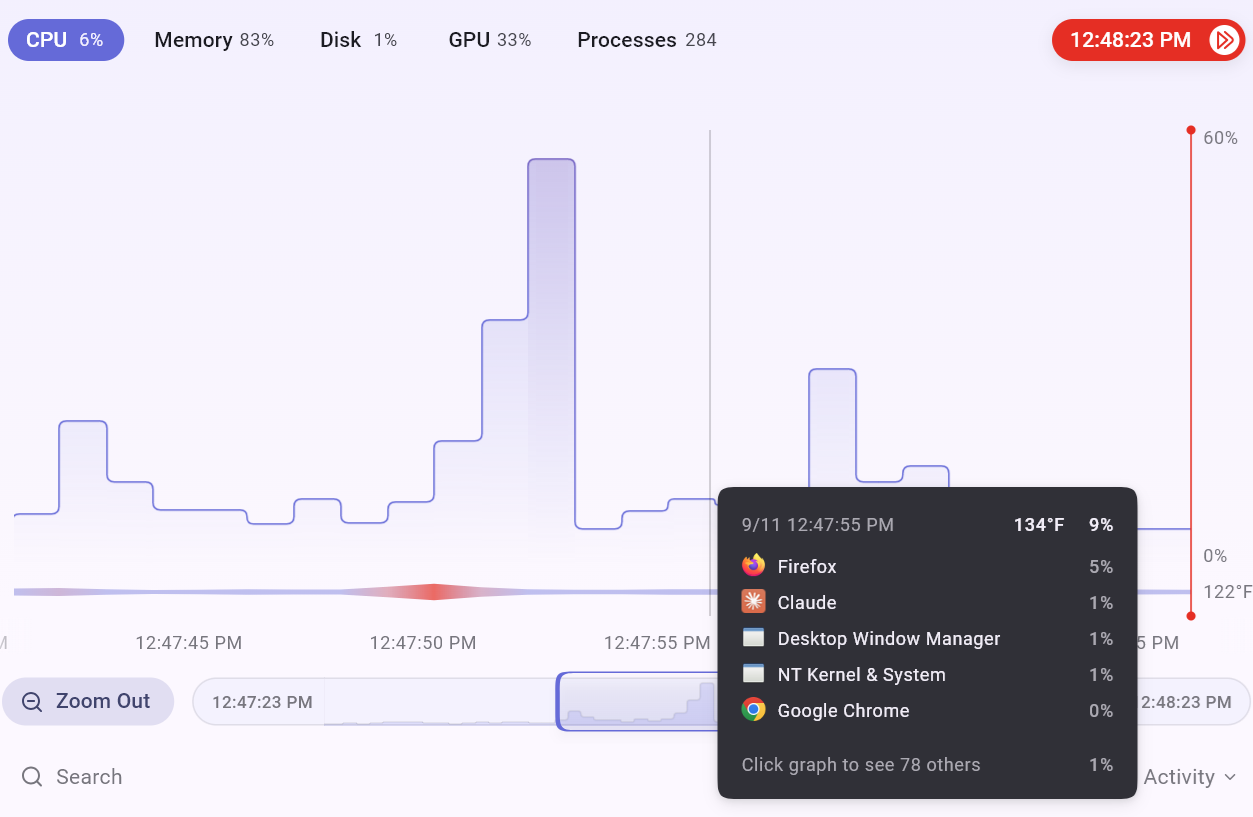
Zoom In on the Timeline: Open AppControl after your session and head to the resource graphs. Click and drag across the CPU, GPU, or Disk graph to zoom in on the exact time range when the stutter hit.
Identify the Spiking Executable: Look at the process list tied to that specific slice of time. AppControl orders processes by resource consumption during that window, and can expose any background updater or telemetry task that briefly overloaded your CPU or Disk.
Inspect the AppControl Event History: Check the Events tab for any new or recently updated executables that executed at that precise moment.
Disable the Offending Process: Click the offending .exe to open its details drawer, read its plain-English description to confirm what it is, and click Disable to prevent it from ever waking up mid-game again.By having AppControl track system activity in the background while keeping Windows resource usage low, you can keep your games buttery smooth without guessing what caused the lag.
Have you caught any bizarre background processes causing game stutters on your setup? Drop by our Official Forum or hop into our Discord to share your findings with the community!
Prefer an AI shortcut to fix your Windows PC lag? You can turn on our popular free optional MCP server feature and simply ask Claude, Gemini, or Cursor what caused your PC to lag. Just ask "What spiked my PC at 8:15 PM?" and your AI agent will read your AppControl logs and tell you in easy to understand terms!
— Jon & the AppControl Team